
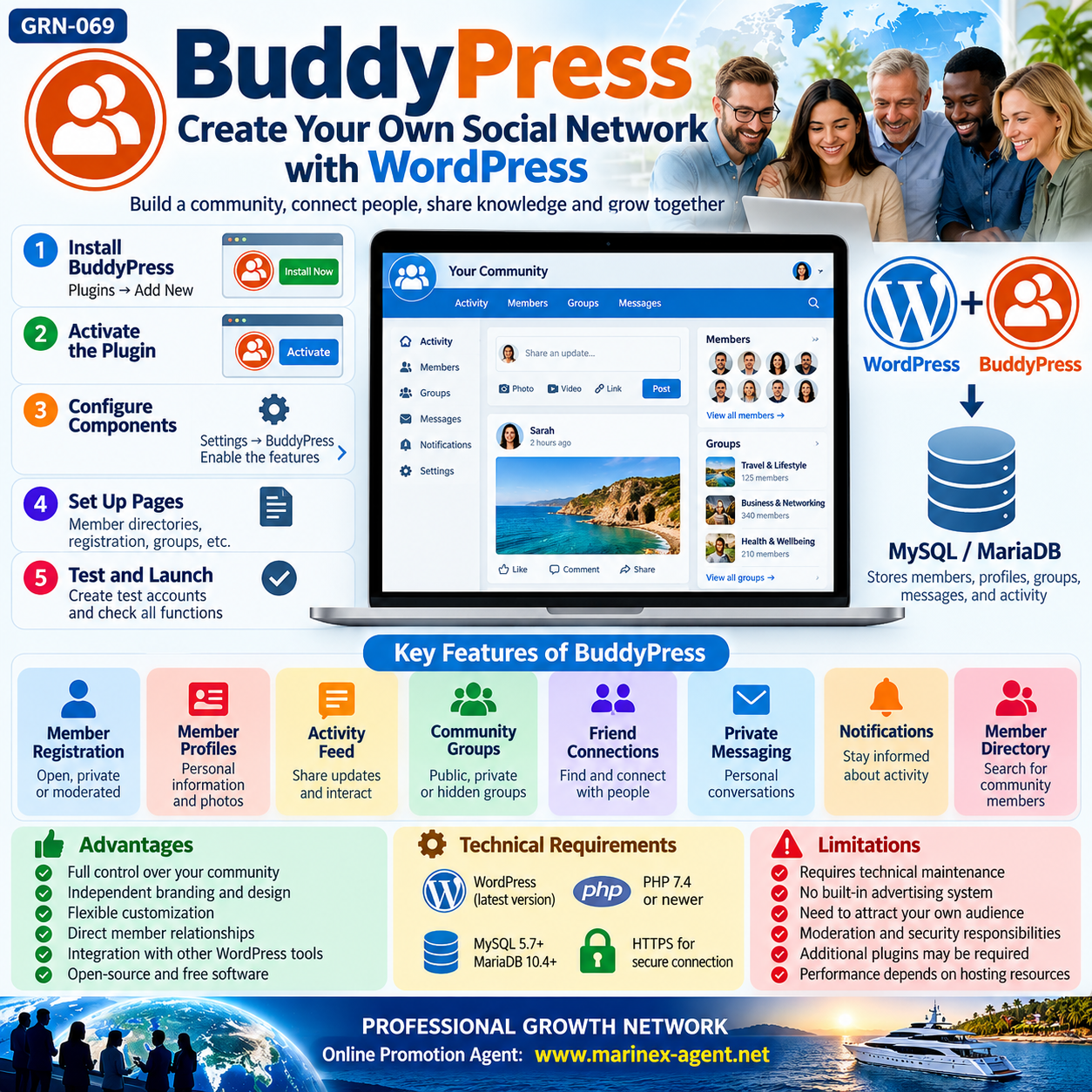
BuddyPress:
How to Create Your Own Social Network with WordPress (2026–2027)
Parent Category: PROFESSIONAL GROWTH NETWORK (PGN)
Category: Personal Growth & Self-Development & Computer Skills & Digital Literacy
Article Code: GRN-069
Introduction
Social networks have become essential tools for communication, education, professional development, business networking, and community building.
However, most online communities depend on major social media platforms that control their infrastructure, algorithms, moderation systems, and access policies.
What if individuals, businesses, educational institutions, or professional organizations could create their own social networks?
BuddyPress offers a practical solution.
BuddyPress is a free, open-source WordPress plugin that transforms a traditional website into an interactive online community with member profiles, activity feeds, groups, private messaging, and other social networking features.
This article explains how BuddyPress works, its main features, technical requirements, installation process, advantages, limitations, and development opportunities.
1. What Is BuddyPress?
BuddyPress is an open-source software solution developed by contributors to the WordPress ecosystem.
It adds social networking functionality to WordPress websites without requiring developers to build an entire platform from scratch.
BuddyPress can support different types of online communities:
- Professional networking communities.
- Educational and university networks.
- Business associations.
- Industry-specific communities.
- Clubs and membership organizations.
- Online learning communities.
- Private corporate networks.
- International interest groups.
BuddyPress is designed to be flexible, allowing administrators to enable only the features their communities require.
Official website: https://buddypress.org/
WordPress Plugin Directory: https://wordpress.org/plugins/buddypress/
2. Main BuddyPress Features
BuddyPress provides several essential components of a modern social network.
1. Member Registration
Visitors can register and become members of the community.
Administrators can configure registration procedures and access permissions.
2. Member Profiles
Each registered member can have a personal profile containing information such as:
- Name and profile photograph.
- Professional background.
- Interests and qualifications.
- Location and contact preferences.
- Additional customized profile fields.
3. Activity Feed
Members can publish updates and interact with content through activity streams.
Depending on enabled components, features include comments, mentions, favorites, and activity notifications.
4. Community Groups
BuddyPress supports:
- Public groups.
- Private groups.
- Hidden groups.
These groups allow members to organize discussions around specific interests or activities.
5. Friend Connections
Members can establish connections with other participants and follow relevant community activity.
6. Private Messaging
Registered members can exchange private messages, including conversations involving multiple recipients.
7. Notifications
Members can receive notifications about relevant activities, messages, and interactions.
8. Member Directory
A searchable directory helps participants discover other community members.
9. Community Activity Tracking
BuddyPress can display information about member participation and WordPress content activity.
10. Additional Features
Functionality can be expanded through compatible WordPress plugins and custom development.
3. Is BuddyPress Free?
Yes. BuddyPress is free and open-source software.
There is no mandatory BuddyPress subscription fee for installing and using its standard functionality.
However, operating an independent social network may involve additional expenses.
| Component | Cost |
|---|---|
| BuddyPress plugin | Free |
| WordPress software | Free |
| Domain registration | Usually paid |
| Website hosting | Usually paid |
| Premium themes | Optional |
| Additional plugins | Free or paid |
| Website development | Depends on requirements |
| Security and maintenance | Depends on implementation |
A basic community can operate with relatively modest resources.
Larger networks with thousands of active members may require additional hosting capacity, caching, database optimization, and professional administration.
4. Technical Requirements
BuddyPress operates within the WordPress environment.
The official BuddyPress documentation recommends hosting that supports:
WordPress
A compatible and regularly updated WordPress installation.
PHP
PHP 7.4 or newer, with a modern supported version preferable for security and performance.
Database
- MySQL 5.7 or newer.
- MariaDB 10.4 or newer.
HTTPS
A secure connection for protecting data transmitted between visitors and the website.
Hosting
A hosting environment capable of handling community activity, database requests, messaging, and simultaneous users.
Important: WordPress already uses a database system. BuddyPress integrates with that existing environment, so a completely separate SQL installation is generally unnecessary.
Before installation, administrators should verify compatibility among WordPress, PHP, BuddyPress, the active theme, and other installed plugins.
5. How to Install BuddyPress
BuddyPress can be installed directly from the WordPress administration panel.
Step 1. Open WordPress Dashboard
Log in to the WordPress website as an administrator.
Step 2. Open the Plugin Directory
Navigate to:
Plugins → Add New Plugin
Step 3. Search for BuddyPress
Enter:
BuddyPress
in the plugin search field.
Step 4. Install
Select the official BuddyPress plugin and click:
Install Now
Step 5. Activate
After installation, click:
Activate
Step 6. Configure Components
Navigate to:
Settings → BuddyPress → Components
Enable the features required by the community.
Step 7. Configure Pages
Open:
Settings → BuddyPress → Pages
Configure member directories, registration pages, and other relevant community pages.
Step 8. Review Settings
Configure registration preferences, group functionality, notifications, and profile-related options.
Step 9. Test the Website
Create several test accounts and verify that registration, profiles, groups, messaging, and notifications work correctly.
Step 10. Launch the Community
After testing security, permissions, performance, and mobile compatibility, the community can be opened to its intended audience.
6. BuddyPress and SQL Databases
A database is one of the most important components of any social networking system.
What Is SQL?
SQL stands for Structured Query Language.
It is used to manage and retrieve structured information stored in relational databases.
WordPress commonly operates with MySQL or MariaDB, which are relational database management systems.
When BuddyPress is installed, its features rely on the WordPress database infrastructure.
The database stores information associated with:
- Registered users.
- Member profiles.
- Activity updates.
- Friend connections.
- Community groups.
- Private messages.
- Notifications.
- Community settings.
The general architecture can be represented as follows:
Website Visitors → WordPress → BuddyPress → MySQL/MariaDB Database
The database processes information, while WordPress and BuddyPress provide the website interface and community functionality.
However, SQL alone cannot create a social network. A complete platform also requires application software, server infrastructure, security controls, and a user interface.
7. Privacy, Security and Administration
Operating an independent social network involves substantial responsibilities.
The website owner becomes responsible for administering the platform and protecting its users.
Account Security
Strong passwords, suitable authentication methods, and administrator access controls help protect accounts.
Data Protection
Personal information should be collected and processed according to applicable privacy laws.
Where relevant, this includes compliance with the General Data Protection Regulation (GDPR).
Backups
Regular backups of website files and databases are essential.
Backups should also be tested to ensure that information can be successfully restored.
Moderation
Community rules should establish acceptable behaviour, prohibited content, reporting procedures, and moderation responsibilities.
Spam Protection
Anti-spam controls can reduce automated registrations, unwanted messages, and abusive activity.
Software Updates
WordPress, BuddyPress, themes, and additional plugins require regular updates.
Access Permissions
Administrators should carefully control who can publish content, manage groups, access private information, or change website settings.
Important: Operating your own social network offers greater administrative control, but it does not eliminate technical risks, cyberattacks, hosting failures, or legal obligations.
8. BuddyPress Compared with Facebook
BuddyPress and Facebook provide some similar social networking features, but their operating models differ significantly.
| Feature | BuddyPress | |
|---|---|---|
| Platform ownership | Website operator controls their installation | Meta controls the platform |
| Member profiles | Available | Available |
| Groups | Available | Available |
| Activity feeds | Available | Available |
| Private messaging | Available | Available |
| Database control | Managed through website infrastructure | Controlled by Meta |
| Hosting | Arranged by website owner | Provided by Meta |
| Advertising system | Requires separate implementation | Integrated advertising platform |
| Maintenance | Website owner’s responsibility | Meta’s responsibility |
| Customization | Extensive possibilities | Limited to platform features |
| Built-in global audience | No | Yes |
The fundamental difference is control.
Facebook provides access to an established social networking ecosystem.
BuddyPress enables an organization or individual to build and administer a separate community.
Neither approach automatically guarantees audience growth, engagement, security, or long-term success.
9. Advantages of an Independent Social Network
Creating an independent online community can provide several strategic benefits.
1. Greater Control
Administrators determine the website structure, community rules, and enabled features.
2. Independent Branding
A community can operate under its own domain, design, and identity.
3. Member Relationships
Organizations can develop direct relationships with registered participants.
4. Flexible Development
New functions can be introduced as community requirements evolve.
5. Structured Information
Member directories, groups, discussions, and other information can be organized within a unified system.
6. Integration Opportunities
BuddyPress can be integrated with compatible WordPress tools, including forums, learning platforms, and membership systems.
7. Data Portability
Website operators generally have greater access to their databases and backups than they would on third-party social media platforms.
Nevertheless, responsible data exports, security measures, and privacy compliance remain necessary.
10. Limitations and Challenges
BuddyPress is a useful community platform, but it is not a complete replacement for Facebook.
Several limitations should be considered.
No Automatic Audience
A newly created network starts without Facebook’s existing user base.
Attracting and retaining members requires communication, marketing, and useful content.
Technical Responsibilities
Administrators must maintain hosting, security, backups, and website performance.
Additional Functions May Be Needed
Advanced media sharing, mobile applications, sophisticated recommendation systems, and specialized business features may require additional plugins or custom development.
Moderation Requirements
Active communities need clear rules, reporting processes, and responsible moderators.
Potential Hosting Costs
As membership and activity increase, server and database requirements may grow.
Support Arrangements
BuddyPress provides community-based support, but free support does not necessarily include guaranteed response times or dedicated technical assistance.
11. A Practical Development Strategy
Launching a social network is more effective when implemented in clearly defined stages.
Stage 1 — Basic Community
Begin with member registration, personal profiles, member directories, and activity feeds.
Stage 2 — Community Interaction
Introduce thematic groups, private messaging, notifications, and improved discussion tools.
Stage 3 — Professional Features
Consider member search, customizable profile fields, forums, and specialized directories.
Stage 4 — Performance and Security
Improve hosting capacity, monitoring, backups, spam protection, and account security.
Stage 5 — Long-Term Development
Explore integrations with learning platforms, events, business directories, and other digital services.
This gradual approach allows administrators to evaluate real user demand before investing in complex additional features.
12. Digital Literacy and Professional Development
Learning how platforms such as BuddyPress operate provides valuable practical knowledge.
It introduces several important digital concepts:
- Website administration.
- Content management systems.
- Relational databases and SQL.
- User registration and authentication.
- Online privacy and cybersecurity.
- Digital community management.
- Website hosting and maintenance.
- Open-source software development.
- Digital communication and networking.
These skills are useful for entrepreneurs, educators, community administrators, website developers, and professionals seeking greater independence in the digital environment.
Understanding how a social network works also helps users become more informed participants in existing social media platforms.
13. Official Resources
For current installation instructions and technical documentation, consult the following resources.
BuddyPress Plugin Directory:
https://wordpress.org/plugins/buddypress/
BuddyPress Official Website:
https://buddypress.org/
BuddyPress Documentation:
https://codex.buddypress.org/
BuddyPress Support:
https://buddypress.org/support/
WordPress Official Website:
https://wordpress.org/
MySQL Official Website:
https://www.mysql.com/
MariaDB Official Website:
https://mariadb.org/
These resources provide information about software requirements, installation, configuration, compatibility, and development.
Conclusion
BuddyPress demonstrates that creating an independent online social community does not necessarily require developing an entirely new software platform.
By combining WordPress, BuddyPress, MySQL/MariaDB, and suitable hosting, individuals and organizations can establish their own social networking environments.
The main advantages include greater control, flexible customization, independent branding, and direct management of community infrastructure.
At the same time, successful operation requires technical maintenance, cybersecurity, moderation, and a sustainable community development strategy.
The most important principle is simple:
Building a social network is not only about technology. It is about creating a useful environment where people can communicate, share knowledge, establish relationships, and grow together.
Digital Knowledge • Independent Platforms • Global Connections • Professional Growth
Parent Category: PROFESSIONAL GROWTH NETWORK (PGN)
Category: Personal Growth & Self-Development & Computer Skills & Digital Literacy
Article Code: GRN-069