
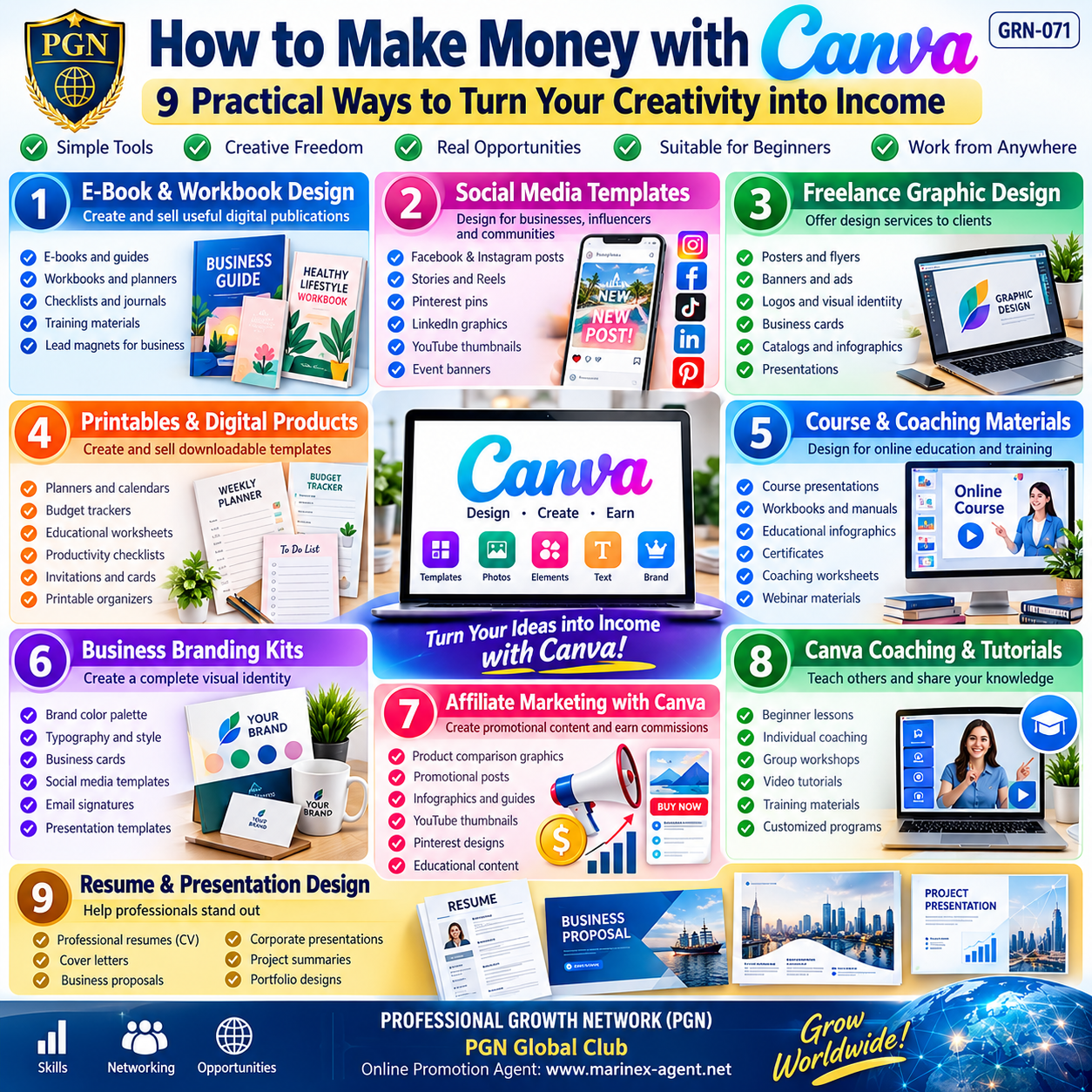
How to Make Money with Canva: 9 Practical Ways to Turn Creativity into Income
Parent Category: PROFESSIONAL GROWTH NETWORK (PGN)
Category: Computer Skills & Digital Literacy / Personal Growth & Self-Development
Article Code: GRN-071
Introduction: Turn Your Creativity into Income
In today’s digital economy, creativity is no longer just a hobby. It can become a valuable professional skill, a source of additional income, or even the foundation of an independent online business.
Canva is a popular online design platform that allows users to create professional-looking graphics, presentations, digital products, marketing materials, and educational resources without extensive experience in graphic design.
Its accessible tools, ready-made templates, and flexible editing capabilities make it particularly attractive to beginners, freelancers, entrepreneurs, educators, and small-business owners.
However, there is an important distinction:
Canva itself does not automatically generate income. Your income comes from solving real problems, creating useful products, and delivering value to customers.
This article explores nine practical ways to monetize your Canva skills, develop your digital competence, and build a sustainable professional presence online.
1. E-Book and Workbook Design
Digital books, guides, planners, and workbooks are widely used for education, marketing, personal development, and professional training.
Canva allows you to create attractive publications without using complicated desktop publishing software.
What Can You Create?
- Educational e-books and practical guides.
- Personal development workbooks.
- Business checklists and instruction manuals.
- Journals, planners, and goal-setting worksheets.
- Training materials and downloadable PDF resources.
- Branded lead magnets for business promotion.
How to Get Started
Step 1: Choose a specific audience and identify a problem you can help solve.
Step 2: Prepare useful, original content.
Step 3: Use Canva to organize the information into an attractive layout.
Step 4: Add graphics, illustrations, tables, and consistent branding.
Step 5: Export the document in a suitable format, usually PDF.
Step 6: Sell the finished publication or offer custom design services.
Where Can You Find Customers?
Potential channels include freelance marketplaces, educational communities, your own website, and digital-product platforms such as Etsy or Gumroad, subject to their current rules.
Business opportunity: Create useful publications once and sell digital copies repeatedly, provided you own the necessary rights and have the appropriate commercial permissions.
2. Social Media Templates
Millions of businesses, entrepreneurs, influencers, and professional communities need attractive graphics for their social media activities.
Many organizations cannot afford a full-time graphic designer, creating opportunities for freelancers who can offer affordable design solutions.
What Can You Create?
- Facebook and Instagram posts.
- Instagram Stories and promotional graphics.
- Pinterest pins.
- LinkedIn business announcements.
- YouTube thumbnails.
- Event invitations.
- Promotional banners.
- Branded content packages.
How to Get Started
Step 1: Research the needs of a specific market, such as restaurants, coaches, consultants, or small retailers.
Step 2: Create sample designs for that audience.
Step 3: Develop coordinated template packages with consistent colors, fonts, and layouts.
Step 4: Prepare preview images that demonstrate the final results.
Step 5: Offer customized design services or reusable templates.
Step 6: Build long-term relationships with clients who need regular content.
Revenue Opportunities
You can offer individual designs, monthly content packages, custom branding, or recurring social media design support.
Business opportunity: Build recurring revenue by serving businesses that continuously need fresh promotional materials.
3. Freelance Graphic Design
Freelance graphic design is one of the most direct ways to turn Canva skills into commercial services.
Instead of developing your own products, you create designs according to the requirements of individual customers.
Services You Can Offer
- Business posters and flyers.
- Event announcements.
- Promotional banners.
- Simple logos and visual identities.
- Business cards.
- Product catalogs.
- Infographics.
- Digital advertisements.
- Presentation materials.
How to Get Started
Step 1: Create a small portfolio featuring your strongest designs.
Step 2: Define the services you can confidently provide.
Step 3: Create a professional profile on relevant freelance platforms.
Step 4: Develop clear service descriptions, prices, and delivery conditions.
Step 5: Contact potential customers and respond to suitable project opportunities.
Step 6: Deliver quality work and collect genuine customer feedback.
Important Professional Considerations
Customers should understand exactly what they are purchasing, including the number of revisions, file formats, and usage rights.
Canva’s content licenses also matter. In particular, using library graphics in logos can create trademark and exclusivity limitations.
Business opportunity: Start with simple design assignments and gradually develop more specialized, higher-value services.
4. Printables and Digital Products
Printables are downloadable files that customers can print themselves or use digitally.
They can be relatively inexpensive to produce and convenient to distribute internationally.
Popular Product Categories
- Daily and weekly planners.
- Budget trackers.
- Educational worksheets.
- Productivity checklists.
- Habit trackers.
- Calendars.
- Invitations and greeting cards.
- Goal-setting templates.
- Business forms and printable organizers.
How to Get Started
Step 1: Identify a specific customer need.
Step 2: Research similar products and find opportunities to improve their usefulness.
Step 3: Create original designs in Canva.
Step 4: Test readability, page dimensions, and print quality.
Step 5: Export the files in suitable formats.
Step 6: Prepare product descriptions and realistic preview images.
Step 7: List your products on an appropriate marketplace or your own website.
How the Business Model Works
After creating a digital product, you can offer it to multiple customers without manufacturing or shipping a physical item.
However, successful sales still require marketing, customer support, product improvement, and compliance with intellectual property rules.
Business opportunity: Develop a growing catalog of useful digital products that can generate repeat sales over time.
5. Course and Coaching Materials
Online education is a rapidly growing field in which trainers, teachers, consultants, and professional coaches need attractive, well-organized learning resources.
Canva can help transform expert knowledge into structured educational materials.
What Can You Create?
- Online course presentations.
- Training manuals and workbooks.
- Educational infographics.
- Student worksheets.
- Coaching questionnaires.
- Learning checklists.
- Certificates of participation.
- Webinar presentations.
- Downloadable learning resources.
How to Get Started
Step 1: Identify a subject you understand well.
Step 2: Define your target audience and their learning objectives.
Step 3: Organize your knowledge into clear modules and lessons.
Step 4: Develop presentations and supplementary materials in Canva.
Step 5: Package the materials into a course or training program.
Step 6: Offer the course through a suitable educational platform or your own website.
Two Different Business Models
Model A — Sell Your Knowledge
If you are an experienced professional, you can develop your own educational courses and coaching programs.
Model B — Sell Your Design Services
If you do not have specialized teaching expertise, you can create presentations and training materials for professional educators.
Business opportunity: Turn professional knowledge into educational products or help other experts present their knowledge more effectively.
6. Business Branding Kits
Every business needs a recognizable visual identity that helps customers distinguish it from competitors.
Canva provides tools for creating coordinated branding materials for small companies, entrepreneurs, and independent professionals.
What Can You Include in a Branding Kit?
- Brand color palette.
- Typography guidelines.
- Business card designs.
- Letterheads.
- Social media templates.
- Presentation templates.
- Email signature graphics.
- Promotional banners.
- Business documentation layouts.
- Simple brand guidelines.
How to Get Started
Step 1: Research the customer’s business, industry, and audience.
Step 2: Identify the desired brand personality and visual style.
Step 3: Develop a coordinated selection of colors, typography, and graphic elements.
Step 4: Design practical business materials.
Step 5: Prepare files in the formats requested by the customer.
Step 6: Provide basic instructions for maintaining visual consistency.
Important Legal Consideration
When designing a distinctive business logo, use original artwork or appropriately licensed materials. Canva library elements generally cannot be incorporated into exclusive, trademarkable logos under Canva’s standard content licensing terms.
Business opportunity: Offer affordable branding packages to startups, freelancers, consultants, and small enterprises.
7. Affiliate Marketing with Canva
Affiliate marketing allows individuals to earn commissions by referring customers to participating companies.
Canva can help create promotional content for affiliate marketing campaigns.
What Can You Create?
- Product comparison graphics.
- Educational infographics.
- Promotional social media posts.
- Pinterest marketing materials.
- Video thumbnails.
- Product presentation slides.
- Informational guides.
- Digital advertising creatives.
How to Get Started
Step 1: Choose a legitimate affiliate program relevant to your audience.
Step 2: Understand its commission structure, promotional requirements, and payment conditions.
Step 3: Develop informative promotional content using Canva.
Step 4: Publish the content through appropriate channels.
Step 5: Include your affiliate links where permitted.
Step 6: Clearly disclose commercial relationships and affiliate commissions.
Step 7: Monitor results and improve your content strategy.
A Sustainable Approach
Successful affiliate marketing depends on credibility, useful information, and genuine customer interest.
Avoid unrealistic earnings promises, misleading product descriptions, and excessive promotional messages.
Business opportunity: Combine content creation skills with ethical affiliate marketing to develop an additional revenue channel.
8. Canva Coaching and Tutorials
Once you become proficient with Canva, you may be able to teach others how to use the platform effectively.
Many individuals and small-business owners want to create their own designs but need practical guidance.
Services You Can Offer
- Beginner Canva lessons.
- Individual coaching sessions.
- Small-group workshops.
- Canva tutorials.
- Business presentation training.
- Social media design workshops.
- Digital product creation lessons.
- Customized training for companies.
How to Get Started
Step 1: Master Canva’s core design tools and practical workflows.
Step 2: Create examples demonstrating different design techniques.
Step 3: Develop a structured beginner training program.
Step 4: Publish useful tutorials to demonstrate your expertise.
Step 5: Offer individual or group training.
Step 6: Prepare downloadable learning materials.
Step 7: Collect feedback and continually improve your teaching.
Revenue Opportunities
You may charge for individual lessons, group training, workshops, or educational programs.
You can also create recorded tutorials and training materials that customers purchase independently.
Business opportunity: Convert your practical Canva experience into educational and consulting services.
9. Resume and Presentation Design
Professional resumes, business proposals, and presentations play an important role in employment, entrepreneurship, and international cooperation.
Canva offers tools for producing visually organized documents that help communicate information clearly.
What Can You Create?
- Professional CVs and resumes.
- Cover letter templates.
- Business proposals.
- Corporate presentations.
- Sales presentations.
- Project summaries.
- Personal professional profiles.
- Portfolio presentations.
- Conference materials.
How to Get Started
Step 1: Identify the customer’s purpose and target audience.
Step 2: Collect the necessary information.
Step 3: Organize the content logically.
Step 4: Select an appropriate design style.
Step 5: Create a clear, professional document.
Step 6: Review accuracy, readability, and formatting.
Step 7: Deliver the completed files.
Special Consideration for Resumes
Some employers use Applicant Tracking Systems (ATS) to process applications.
Therefore, an attractive Canva resume should not automatically replace a simple, machine-readable resume. For applications using automated screening, a clean text-based version may be preferable.
Business opportunity: Help professionals present their experience and qualifications more effectively.
10. Canva and the Professional Growth Network (PGN)
The nine opportunities described above are closely connected with the mission of our PROFESSIONAL GROWTH NETWORK.
Our goal is not simply to teach people how to use digital tools.
We want people to understand how digital knowledge can become a foundation for:
- Professional independence.
- Additional sources of income.
- Small-business development.
- International cooperation.
- Personal branding.
- Online entrepreneurship.
- Long-term professional growth.
From Digital Skills to Business Opportunities
Learning Canva may be the first step.
However, the next step is equally important: transforming that knowledge into commercially valuable products or services.
A person might learn to create attractive social media graphics, but without customers, marketing, and a professional reputation, this skill may remain only a hobby.
The PGN Global Club concept addresses this challenge by connecting personal development with professional visibility and international networking.
11. The Role of Your Personal Online Promotion Agent
Within the Marinex-Agent concept, every independent professional or small-business owner can develop a personal online presence.
Instead of promoting only somebody else’s products or services, a person first establishes their own professional identity.
A Practical Example
Imagine an individual who has learned Canva and now offers social media design services.
That individual could develop the following professional structure:
Step 1 — Digital Skills
Learn Canva and develop a portfolio of original designs.
Step 2 — Professional Services
Define a clear range of services, such as social media graphics, business presentations, or branding materials.
Step 3 — Personal Web Presentation
Create a professional profile describing experience, services, examples of completed projects, and contact information.
Step 4 — Personal Domain Name
Register an independent domain name that becomes part of the professional identity.
Step 5 — Online Promotion
Use Marinex-Agent or another suitable platform to promote the professional presentation.
Step 6 — International Networking
Establish contacts with potential customers and business partners through PGN Global Club and other networks.
Step 7 — Business Development
Gradually expand the customer base, service portfolio, and professional reputation.
The PGN Development Formula
Learn Digital Skills → Create Valuable Services → Build Your Personal Brand → Establish Your Web Presence → Promote Yourself → Find International Customers → Grow Your Business.
This approach is not limited to graphic designers.
It can be applied to consultants, educators, engineers, translators, freelancers, business intermediaries, and many other professionals.
12. Important Commercial and Legal Considerations
Before selling Canva-based products or services, it is essential to understand the applicable commercial conditions.
Canva Licensing
Canva generally permits many commercial uses of original designs, but there are restrictions.
For example:
- Canva stock content cannot simply be resold as standalone content.
- Editable templates containing Canva Pro content have special sharing requirements.
- Canva library elements may not be suitable for exclusive trademark registration.
- Customers should receive clear information about the rights included in their purchase.
- Third-party photographs, illustrations, trademarks, and other materials require appropriate usage permissions.
Always review the latest official Canva licensing documentation before distributing or selling commercial products.
Official references:
- https://www.canva.com/policies/content-license-agreement/
- https://www.canva.com/help/using-canva-to-create-products-for-sale/
Business and Financial Responsibilities
Individuals who begin earning money from digital services should also consider:
- Local business registration requirements.
- Applicable taxation.
- Customer contracts and payment terms.
- Intellectual property rights.
- Platform commissions and transaction fees.
- Customer privacy and data protection.
- Accurate records of business income and expenses.
Income Is Not Guaranteed
Creating digital products does not automatically produce passive income.
Customer research, marketing, product quality, reputation, and continuous improvement remain essential to long-term success.
13. A Practical 30-Day Canva Business Starter Plan
Beginners can use a simple development schedule to organize their first month.
Week 1 — Learn
Explore Canva’s interface, essential design tools, layout principles, typography, and export formats.
Choose one of the nine business directions described in this article.
Week 2 — Create
Develop five to ten portfolio samples that demonstrate your abilities.
Focus on quality, consistency, and solving real customer problems.
Week 3 — Establish Your Professional Presence
Prepare a clear service description, organize your portfolio, and create a professional web presentation.
Consider registering a personal domain if it supports your long-term plans.
Week 4 — Promote
Introduce your services to potential customers, publish useful examples, and establish professional contacts.
Analyze responses and improve your offers.
The initial objective should not be immediate financial success. It should be the development of a credible professional service and the acquisition of your first satisfied customers.
Conclusion: Your Design Skills Can Change Your Professional Future
Canva provides an accessible starting point for people interested in digital creativity, entrepreneurship, and professional self-development.
The nine opportunities presented in this article demonstrate how design skills can be applied to different markets:
- E-Book and Workbook Design.
- Social Media Templates.
- Freelance Graphic Design.
- Printables and Digital Products.
- Course and Coaching Materials.
- Business Branding Kits.
- Affiliate Marketing with Canva.
- Canva Coaching and Tutorials.
- Resume and Presentation Design.
Each direction offers its own possibilities, customer requirements, and challenges.
The most important lesson is that successful digital entrepreneurship requires more than technical knowledge.
It requires initiative, continuous learning, professional responsibility, marketing, and the ability to build long-term relationships.
Within the PROFESSIONAL GROWTH NETWORK, we believe that every person should have the opportunity to develop useful skills, establish a professional identity, and participate in international business cooperation.
First, develop your skills. Then create value. Build your professional identity, promote yourself, and expand your opportunities worldwide.
PROFESSIONAL GROWTH NETWORK (PGN)
PGN Global Club
Online Promotion Agent: https://www.marinex-agent.net/
Article Code: GRN-071