
TOUCH TYPING — Type Smarter, Faster
and More Accurately
ARTICLE CODE: GRN-007
In today’s digital world, typing is one of the most frequently used professional skills. Emails, reports, documents, databases, online communication and everyday business activities all require constant keyboard work.
Touch typing is a method of typing without constantly looking at the keyboard. Instead of searching for individual keys, a person learns to use specific fingers for specific areas of the keyboard and gradually develops muscle memory.
What Is Touch Typing?
Touch typing is based on correct finger positioning and regular practice.
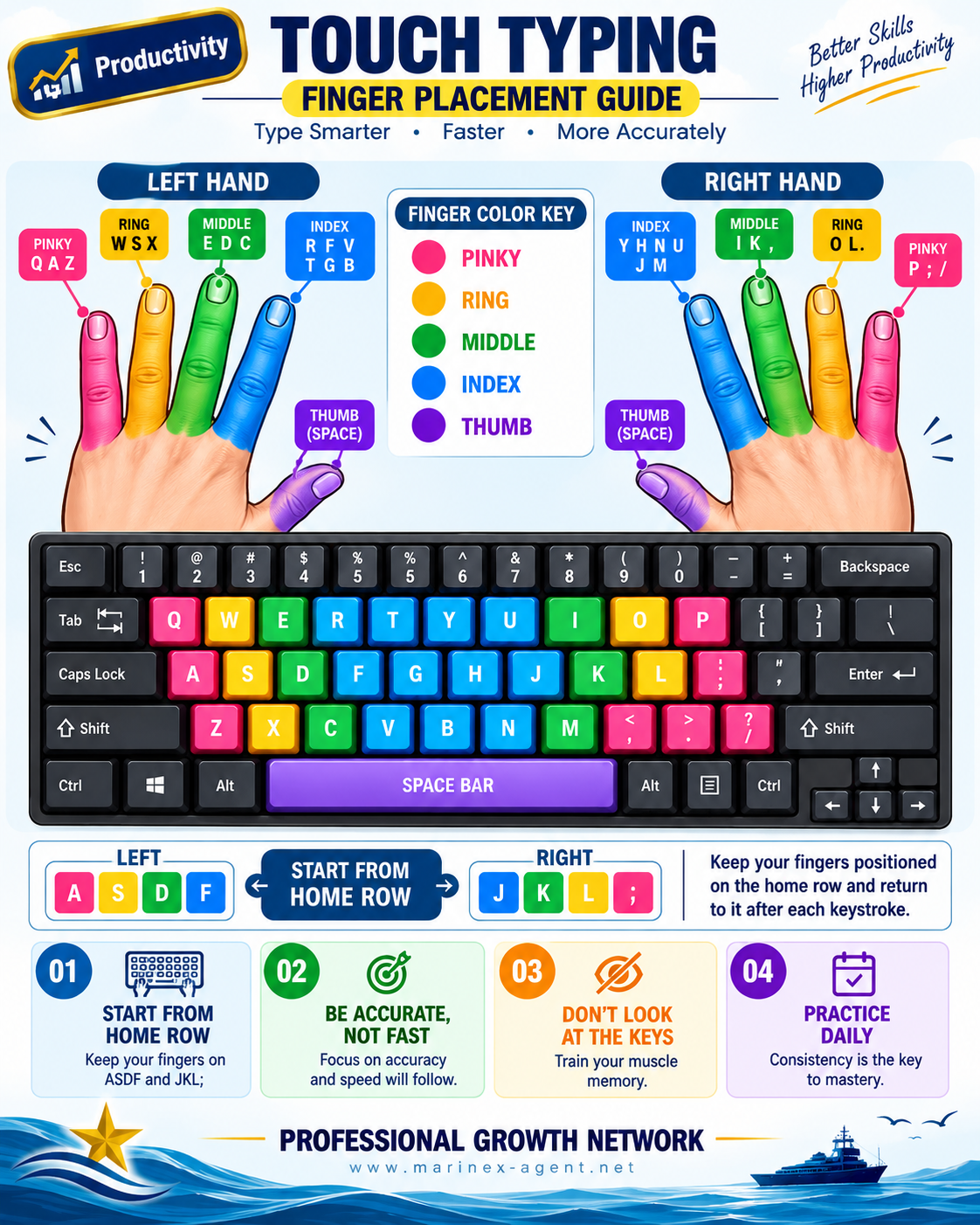
The starting position is called the Home Row:
Left hand: A – S – D – F
Right hand: J – K – L – ;
Each finger is responsible for a particular group of keys. After pressing a key, the fingers should naturally return to their home-row position.
The thumbs are primarily used for the Space Bar.
Why Is Touch Typing Useful?
Touch typing is not simply about typing faster. Its main purpose is to make keyboard work more natural, accurate and efficient.
With regular practice, touch typing can help you:
- increase typing speed;
- improve accuracy;
- reduce the need to look at the keyboard;
- concentrate more on the content you are writing;
- work more efficiently with emails, documents and databases;
- develop useful muscle memory;
- improve overall digital productivity.
Accuracy Before Speed
One of the most important principles of learning touch typing is:
Be accurate, not fast.
Beginners often try to increase their speed immediately. This can create incorrect habits and increase the number of mistakes.
It is better to type slowly and correctly at first. Speed normally develops naturally as your fingers become familiar with the keyboard.
Don’t Look at the Keys
Try to keep your eyes on the screen rather than on the keyboard.
At first, this may feel uncomfortable and your typing speed may decrease. This is a normal part of the learning process.
The objective is to train your fingers to find the correct keys automatically.
Practice Daily
Consistency is more important than long training sessions.
Even short periods of regular practice can gradually improve coordination, accuracy and speed. The key is to maintain the correct finger positions and repeat the movements until they become automatic.
Touch Typing and Professional Growth
Typing is a basic skill, but its impact on productivity can be significant.
For people who regularly work with correspondence, reports, spreadsheets, databases, websites or other digital tools, efficient keyboard use can save time every working day.
Touch typing therefore represents a simple but valuable example of Professional Growth: improving a fundamental everyday skill that can make many other professional activities easier and more efficient.
Remember
Start from the Home Row.
Focus on accuracy before speed.
Don’t look at the keys.
Practice regularly.
Small improvements practiced consistently can become valuable professional skills.
PROFESSIONAL GROWTH NETWORK
Better Skills • Higher Productivity • Continuous Growth
Website: www.marinex-agent.net