
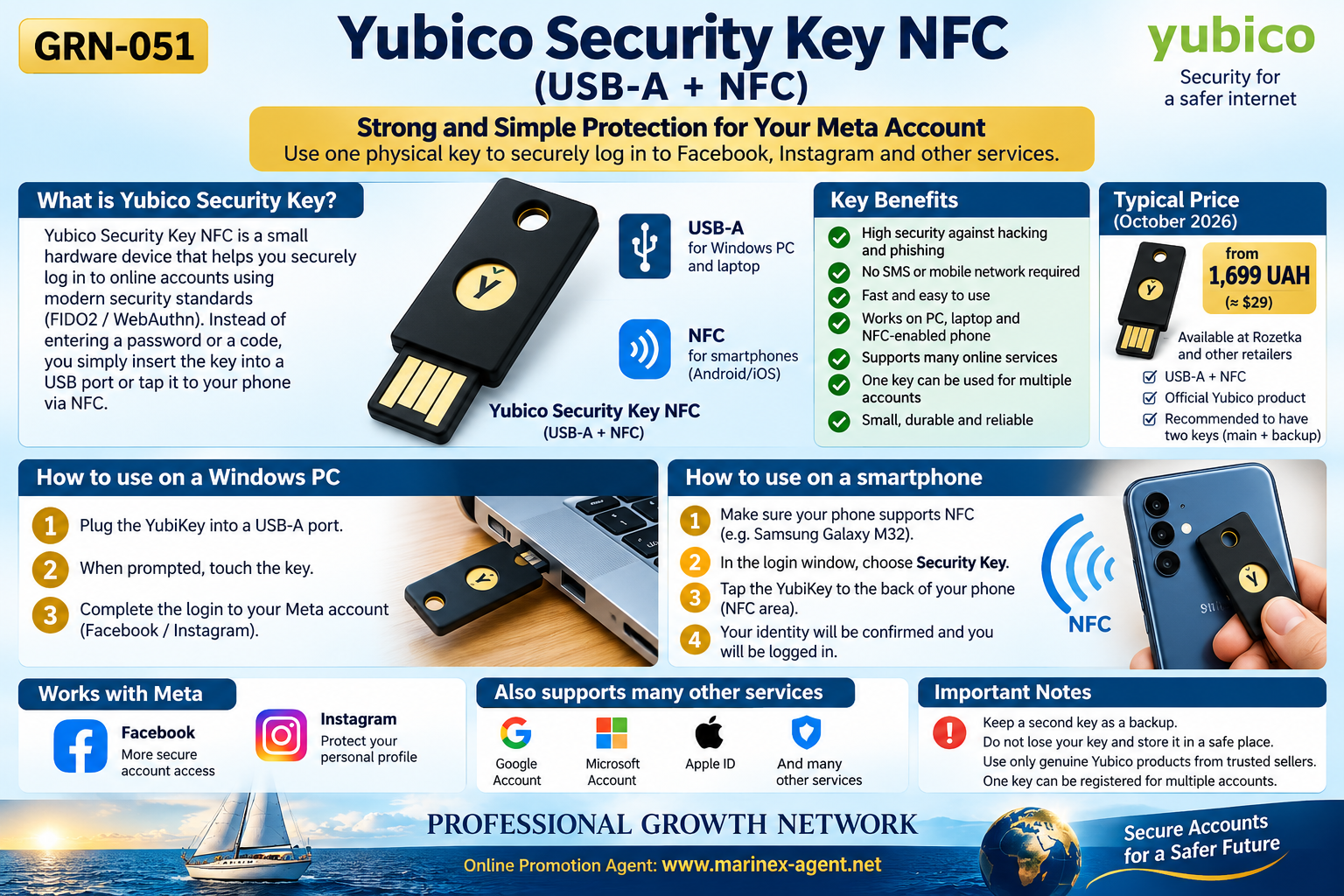
YUBICO SECURITY KEY NFC (USB-A + NFC): STRONG AND SIMPLE PROTECTION FOR YOUR ONLINE ACCOUNTS
Parent Category: PROFESSIONAL GROWTH NETWORK
Category: Computer Skills & Digital Literacy / WEB & DIGITAL TOOLS
Article Code: GRN-051
Protecting your digital identity is an essential part of personal and professional development.
Today, entrepreneurs, business representatives, consultants, and online promotion agents depend on digital platforms such as Facebook, Instagram, Google, and Microsoft.
Losing access to these accounts can interrupt business communications, damage professional relationships, and expose confidential information.
One practical solution is the Yubico Security Key NFC (USB-A + NFC) — a physical security device designed to provide strong protection against unauthorized account access.
1. What Is a Yubico Security Key?
The Yubico Security Key NFC is a compact hardware device that supports modern authentication standards, including FIDO2 and WebAuthn.
Unlike traditional authentication methods that rely on passwords or SMS verification codes, a security key uses cryptographic authentication to verify the user’s identity.
The device can be connected to a computer through a standard USB-A port or used with compatible smartphones through Near Field Communication (NFC).
Its main purpose is to make unauthorized access significantly more difficult, even if an attacker obtains an account password.
2. Key Benefits of Hardware Security Keys
1. Strong Protection Against Phishing
Security keys provide phishing-resistant authentication by verifying the legitimate website or service during the authentication process.
2. No SMS Verification Required
Users do not need to wait for SMS messages or depend on mobile network delivery.
3. Simple Operation
Authentication generally requires inserting the key into a USB port or tapping it against an NFC-compatible smartphone.
4. Multiple Device Compatibility
The USB-A + NFC model can work with compatible Windows computers, laptops, and smartphones.
5. One Key for Multiple Accounts
A single security key can be registered with multiple supported online services.
6. Compact and Durable
The device is small, portable, and designed for everyday use.
3. How to Use the Security Key on a Windows PC
The Yubico Security Key NFC can be used with a Windows computer equipped with a standard USB-A port.
Basic procedure:
- Open the security settings of an online account that supports hardware security keys.
- Select the option to add or register a security key.
- Insert the Yubico Security Key into the USB-A port.
- Follow the instructions displayed by the website or browser.
- Touch the security key when requested.
- Complete the registration process.
After successful registration, the key can be used to verify future sign-ins according to the service’s security settings.
Important: Simply connecting the key to a computer does not automatically protect an account. The key must first be registered with each supported service.
4. How to Use the Security Key on a Smartphone
The same security key can be used with smartphones that support NFC and compatible authentication software.
For example, the Samsung Galaxy M32 with NFC can potentially communicate with the Yubico Security Key NFC.
Basic procedure:
- Make sure NFC is enabled on the smartphone.
- Open the relevant account’s security settings or login page.
- Select the security key authentication option.
- When prompted, hold the Yubico key near the phone’s NFC detection area.
- Follow the instructions to complete authentication.
The exact procedure depends on the smartphone, browser, operating system, and online service.
This allows one physical security key to serve compatible computers and smartphones without relying on SMS verification.
5. Protecting Facebook and Instagram Accounts
For entrepreneurs and online promotion agents, Facebook and Instagram are important business communication and marketing platforms.
Meta offers security settings that may include hardware security key authentication.
A typical setup process involves:
- Opening Meta Account → Login and security.
- Selecting Two-factor authentication.
- Choosing Security keys, where supported.
- Following Meta’s registration instructions.
- Testing the authentication process after setup.
Security key availability and setup steps may vary depending on the account and device.
Why is this important?
A compromised social media account may result in unauthorized messages, fraudulent business offers, reputational damage, and loss of access to professional contacts.
Hardware security keys help reduce these risks.
6. Other Online Services Supporting Security Keys
Hardware security keys can also be used with many other digital services, including compatible account security systems from:
- Google — Google Account protection.
- Microsoft — Microsoft Account and supported business services.
- Apple — Apple Account security key authentication.
- Other online platforms — services supporting FIDO2, WebAuthn, or compatible security key methods.
Support differs by provider. Some services use hardware keys as a second authentication factor, while others also support passwordless login.
Each account requires its own registration procedure.
7. Security Key NFC — Estimated Cost
As a preliminary price reference for October 2026, the Yubico Security Key NFC (USB-A + NFC) has been considered in the approximate price range of:
From UAH 1,699 per key in Ukraine.
The manufacturer’s indicative international price is approximately USD 29.
Actual prices, availability, delivery charges, and warranty conditions depend on the seller and purchase date.
Potential purchasing sources include authorized distributors and established Ukrainian electronics retailers.
Buyers should verify the exact product model and seller before purchasing.
8. Why Two Security Keys Are Recommended
Although one security key can protect multiple accounts, relying on a single physical device creates a potential recovery problem if it is lost or damaged.
A practical arrangement is:
PRIMARY SECURITY KEY — used for regular authentication.
BACKUP SECURITY KEY — stored securely in a separate location.
Where supported, both keys should be registered with the same important accounts.
Users should also preserve recovery codes and maintain current account recovery information.
Never assume that purchasing a second key automatically makes it a backup. It must be registered before the primary key becomes unavailable.
9. Security Keys Compared With Other Authentication Methods
| Authentication Method | Main Advantage | Main Limitation |
|---|---|---|
| SMS verification | Familiar and widely available | Depends on message delivery; vulnerable to certain attacks |
| Authentication app | Free and works without mobile service | Verification codes can still be exposed through phishing |
| Hardware security key | Strong phishing-resistant authentication | Requires a compatible physical device |
| Passkey | Convenient phishing-resistant authentication | Availability and recovery depend on the platform and device |
Hardware security keys are particularly valuable for individuals who manage important online identities and business accounts.
10. Applications for Professional Growth Network Members
Within PROFESSIONAL GROWTH NETWORK (PGN), digital security is an important component of professional development.
Members may use online accounts to:
- Communicate with international business partners.
- Promote products and services.
- Manage professional social media profiles.
- Operate websites and online stores.
- Develop personal web presentations.
- Coordinate independent business activities.
Protecting these accounts helps preserve business continuity, professional reputation, and customer confidence.
For an Online Promotion Agent, account security is not merely a technical issue — it is part of responsible business management.
11. Practical Recommendations Before Purchasing
Before purchasing a Yubico Security Key NFC:
- Confirm that the computer has a compatible USB-A port.
- Verify that the smartphone supports NFC.
- Check whether the intended online services support hardware security keys.
- Consider purchasing a second key for backup.
- Purchase from a reputable seller.
- Prepare secure recovery methods before activating hardware authentication.
The key should be registered and tested carefully, especially for accounts essential to daily business operations.
Conclusion
The Yubico Security Key NFC (USB-A + NFC) is a practical security solution for individuals and entrepreneurs who want stronger protection for their digital accounts.
Its main advantages include phishing-resistant authentication, USB-A and NFC compatibility, and the ability to protect multiple supported services with one physical device.
For members of PROFESSIONAL GROWTH NETWORK, reliable account security supports long-term business development and a trustworthy online presence.
SECURE YOUR DIGITAL IDENTITY — PROTECT YOUR PROFESSIONAL FUTURE.
Official Resources
- Yubico: https://www.yubico.com/
- Yubico Security Key Series: https://www.yubico.com/products/security-key/
- Yubico Support: https://support.yubico.com/
- Meta Accounts Center: https://accountscenter.facebook.com/
PROFESSIONAL GROWTH NETWORK
Knowledge • Skills • Opportunities • A Better Future
Online Promotion Agent: https://www.marinex-agent.net
Article Code: GRN-051